Section 02 - Software Design and Specifications
Coding Standards and Style
We use Google Java Style Guide as our published, reviewed, and industry-accepted code style. For more details see page 93 of the VVSG Volume 1.0 guide.
Code development and review processes are described in Section 13 - Quality Assurance Plan.
Java 17
The tabulator is written in Java because it meets the VVSG and California requirements for software language selection. It is widely supported and popular in both industry and the open-source community for a wide variety of applications. It offers a mature and robust collection of third-party libraries. The Java Runtime Environment is standard on our target platforms which means a simple installation process. Our specific version of Java is OpenJDK 17.0.2 and it can be downloaded here.
Open Source
We develop the tabulator as an open-source project for three main reasons:
- Transparency: published source code increases public confidence in the application by giving anyone the opportunity to review our work and the processes and methodology behind it.
- Adoption: open-source licensing encourages others to use the software to facilitate the spread of ranked choice voting.
- Collaboration: open-source licensing enables other software developers to contribute enhancements to the project and incorporate it into other related projects (RCV visualizers, policy research, etc.)
Architecture
RCTab consists of one in-house java code module built from 27 source files. These are described in more detail under Tabulator Java Classes below. The Tabulator relies on basic java platform libraries (file I/O, string processing, logging) and several 3rd-party modules listed below for reading and writing various file formats. These code modules are compiled and packaged with a minimal java runtime environment (17.0.2) which executes compiled object code when installed and run on the target system.
Tabulator Java classes
The following Java classes comprise the entirety of all in-house developed software and implement all core functionality of the Tabulator.
AuditableFile: Create a file that, on close, is read-only and has its hash added to the audit log.CastVoteRecord: The in-memory representation of each cast vote record read from a source file. When source files are first processed at the beginning of a tabulation, eachCastVoteRecordobject contains the data parsed from the source, including the candidate rankings, the precinct ID, and other relevant metadata. As the tabulation progresses, the object keeps track of the cast vote record’s fate, including which candidate(s) this ballot is counting toward and whether it has been exhausted.ClearBallotCvrReader: Contains the logic for parsing a CVR source file in Clear Ballot’s comma-separated value format and populating a list ofCastVoteRecordobjects.CommonDataFormatReader: Contains the logic for parsing a CVR source file in the Common Data Format and populating a list ofCastVoteRecordobjects. It supports both XML and JSON.ContestConfig: A wrapper aroundRawContestConfig. It performs extensive validation to confirm that a config file contains parameters that are permitted by the software and consistent with one another. It also has logic for reading a config file from disk, preprocessing the candidate data from a config, and normalizing some of the config values for use during tabulation.ContestConfigMigration: Provides support for identifying whether a config file’s version is compatible with the version of the application that is running. It also contains logic for automatically migrating a config from an older version to make it compatible with the current version.DominionCvrReader: Contains the logic for parsing a set of CVR source files in Dominion’s JSON format and populating a list ofCastVoteRecordobjects.FileUtils: A few simple utility functions for reading from and writing to directories on disk.GuiApplication: The simple logic for launching the application’s graphical user interface, including loading the main layout markup stored in theGuiConfigLayout.fxmlfile.GuiConfigController: Contains most of the logic for the interactive components of the graphical user interface, ensuring that the application responds appropriately when the user clicks a button, menu item, or other interactive element.GuiContext: A singleton class that supports the graphical user interface in managing file chooser dialogs for opening and saving config files.GuiTiebreakerController: Supports the interactive logic for selecting a tie-breaker winner or loser in the graphical user interface when the tie-break mode is set to one of the interactive options.HartCvrReader: Contains the logic for parsing a CVR source file in the Hart XML format and populating a list ofCastVoteRecordobjects.JsonParser: Generic logic for reading JSON files from disk and writing them to disk. It’s used by the JSON parsing code for parsing Common Data Format and Dominion CVR files, as well as for reading and writing tabulator config files.Logger: Handles the formatting and saving to disk of audit and operator log files.Main: The main entry point for the application. Depending on the arguments supplied, it either launches the graphical user interface or proceeds with a command-line-based tabulation.RawContestConfig: ARawContestConfigobject is a simple in-memory representation of a config file loaded from disk.ResultsWriter: After a tabulation completes, aResultsWritergenerates all of the appropriate summary results files and saves them to disk. Results files can include a summary CSV spreadsheet file, a summary JSON file, a full Common Data Format JSON file, and corresponding .hash files. When “tabulate by precinct” is enabled, it also produces separate summary files for each precinct.SecurityConfig: Configuration for the cryptographic signing of a Hart file.SecuritySignatureValidation: A set of tools to verify signatures of Hart CVRs.SecurityTests: Test the cryptographic signature validation functionality.SecurityXmlParsers: In-memory representation of.sig.xmlsignature files.StreamingCvrReader: Contains the logic for parsing a CVR source file and populating a list ofCastVoteRecordobjects. It also extracts a list of precinct IDs if tabulation by precinct is enabled.Tabulator: The core logic for tabulating a contest given a list ofCastVoteRecordobjects and aContestConfig, it runs the round-by-round tabulation, writing to the tabulation log file as it proceeds, and then callsResultsWriterto generate results files when it completes.TabulatorSession: Manages the process of running a single tabulation. Given the path to a config file, it loads and validates the config, loads and parses the cast vote record source files, and runs the tabulation, including generating the results files at the end. It also contains logic for converting a CVR file into a Common Data Format CVR file without actually running a tabulation.TabulatorTests: Runs all of the regression tests. Each test involves loading a config file and, if it’s valid, running the tabulation and then comparing the output summary JSON file to an existing file containing the expected output. If the config file hasgenerateCdfJsonenabled, it also compares the generated CDF JSON file to an existing file containing the expected version of this output.TallyTransfers: TheTabulatorclass maintains aTallyTransfersobject (and one per precinct if tabulating by precinct is enabled) to keep track of the number of votes transferring from each source to each destination in each round as candidates are eliminated or elected. This data is included in the results summary JSON to enable Sankey plot visualizations.Tiebreak: Contains the logic for breaking a tie when the tabulation needs to select a candidate for elimination or election and multiple candidates are tied with the same current vote total.Utils: Miscellaneous utility functions for processing strings and identifying the user’s environment.
3rd-party Modules
RCTab incorporates several 3rd-party modules which are all open-source. These meet the VVSG and California requirements for third-party modules. They are mature and widely accepted and used. None of them are modified in any way.
| Module Name | Version | Purpose | Link |
|---|---|---|---|
| Apache Commons CSV | 1.9 | CSV "Comma Separated Values" reader / writer. | https://commons.apache.org/proper/commons-csv/user-guide.html |
| Apache POI OOXML | 5.2.2 | Excel spreadsheet reader / writer. | https://poi.apache.org/apidocs/dev/org/apache/poi/ooxml/package-summary.html |
| Jackson Core | 2.13.3 | XML / JSON streaming reader / writer core | https://github.com/FasterXML/jackson-core |
| Jackson Annotations | 2.13.3 | XML / JSON deserialization annotations | https://github.com/FasterXML/jackson-annotations |
| Jackson Databind | 2.13.3 | XML / JSON deserialization | https://github.com/FasterXML/jackson-databind |
| Jackson Dataformat XML | 2.13.3 | XML reader / writer | https://github.com/FasterXML/jackson-dataformat-xml |
| Jupiter JUnit API | 5.9.0 | Automated testing (used only during development) | https://mvnrepository.com/artifact/org.junit.jupiter/junit-jupiter-api |
| Jupiter JUnit Engine | 5.9.0 | Automated testing (used only during development) | https://mvnrepository.com/artifact/org.junit.jupiter/junit-jupiter-engine |
| BouncyCastle FIPS API | 1.0.2.4 | RSA Validation | https://mvnrepository.com/artifact/org.bouncycastle/bc-fips/1.0.2.4 |
Software Limits: Limitations of the Tabulation software i.e., how many CVRs can be tabulated are detailed in Section 03 - System Hardware Specification document.
Contest Tabulation Logic
Overview
When the user triggers a contest tabulation, the application creates a new TabulatorSession object to manage the process flow. The TabulatorSession loads, parses, and validates the contest config file. If those steps succeed, it reads the cast vote records into memory, runs the tabulation, and generates the results summary files. Throughout these processes logging output is written to two locations as detailed below under RCTab Logging
- Read the config file
- Validate the config file
- Read cvr files
- Round by round tabulation of votes according to configuration
- Generate reports
For detailed user guides, see Section 18 - User Guide and Section 25 - Configuration File Parameters. Note that this document covers all tabulation logic in RCTab in order to fully describe the software design. All tabulation logic is described in the ‘Tabulation of CVRs’ section below, in conjunction with the draft VVSG 2.0 1500-107 Voting Methods and Tabulation Models document (for which RCTab acts as a reference implementation), as well as with reference to all RCV laws currently in use in the United States. Contact the manufacturer for a folder with all such RCV laws and/or a copy of that unpublished draft standard.
Reading a config file
When a user selects an existing config file to open, the tabulator parses the JSON file and stores the information in a RawContestConfig object. This object is wrapped inside a ContestConfig object. The ContestConfig object serves as an interface between the config file and the rest of the application, providing extensive validation logic and a number of convenience methods for accessing normalized versions of the config settings.
A config file includes a tabulatorVersion string and a collection of parameters organized into four sections.
The tabulatorVersion is used to confirm that the version of the application that’s loading the config file is compatible (specifically: not older than) the version of the application that created the file.
The outputSettings section contains settings related to what forms of output should be generated and where it should be saved on disk.
The cvrFileSources section is a list of one or more source file paths containing cast vote records, along with the parameters necessary for the tabulator to parse the records successfully.
The candidates section lists all of the candidate names/codes that appear in any of the CVR source files.
The rules section contains all of the parameters that determine exactly how the application should tabulate the cast vote records and produce results.
Writing the config file
A user can create a new config file or open an existing one and edit it. The GUI allows the user to modify all of the parameters that populate a config file (except for tabulatorVersion, which is determined by the app), run a validation to confirm that all of the settings in the file are valid, and save the file.
Validation
Config file validation checks each aspect of the file and attempts to verify that all of the individual settings are compatible with one another and should result in a successful tabulation. This includes confirming that the tabulation rules are consistent, that the candidate names are valid and don’t contain duplicates, and that each source cvr file exists on disk, and has the proper parameters set for that cvr provider. The GUI prevents the user from creating a config file that would fail many of these checks, but the validation assumes nothing and provides an additional layer of protection against user error. Because a user can create or modify a config file simply using a text editor the tabulator can’t assume that a config file has only been modified by its own GUI.
Reading CVR Files
Reading the cast vote records into memory consists of parsing the source files and creating a CastVoteRecord object to represent each record. This object contains the candidate rankings for the CVR along with additional information parsed from the source file such as an ID and a precinct name. As the tabulation progresses, the CastVoteRecord object also stores information about the CVR’s fate in each round (which candidate(s) its vote is counting toward and what fraction of the vote belongs to each). The details of parsing each source file depend on that file’s provider.
Tabulation of CVRs
Note: for all winning modes other than MULTI_SEAT_SEQUENTIAL_WINNER_TAKES_ALL (a.k.a. multi-pass IRV), the application performs a single tabulation when it processes a config file. For multi-pass IRV, it instead performs a sequence of single-seat tabulations in which each tabulation excludes the candidates who have won on prior iterations, continuing until it has run numWinners tabulations and identified numWinners winners.
For the tabulation itself, the application creates a Tabulator object. This object’s tabulation method runs a loop that iterates until it determines that the tabulation is complete. Each iteration of the loop is a new round. Each round starts by calling computeTalliesForRound, which iterates over all of the cast vote records and sums up the total number of current votes for each candidate. This involves a number of steps:
- If the CVR has already been marked as exhausted, it is skipped.
- If the CVR was counted toward a candidate in the previous round and that candidate is still active, it’s counted toward that candidate again in this round.
- If the CVR has no rankings at all, it is marked as exhausted.
- The tabulator then begins iterating through the rankings in the CVR, starting with the most preferred rank found (i.e., the lowest rank number, which is typically 1) and proceeding in order. At each rank, it checks for a number of possible cases:
- If the number of rankings skipped between the last ranking seen and this one exceeds the maxSkippedRanksAllowed value in the config, the CVR is marked as exhausted.
- If one or more of the candidates at this rank already appeared at another rank and the config has enabled exhaustOnDuplicateCandidate, the CVR is marked as exhausted.
- If the rankings at this rank constitute an overvote, the CVR is handled according to the overvote rule set in the config.
- If a continuing candidate is found at this rank, the CVR is marked as counting toward the candidate.
- Otherwise, the CVR is marked as exhausted.
- If the config has enabled tabulation by precinct, the method also updates the per-precinct tallies for this round.
Next, if the tabulation is in the first round and/or the contest is for a single seat or the mode is MULTI_SEAT_SEQUENTIAL_WINNER_TAKES_ALL (multi-pass IRV), the software sets/updates the winning threshold (the number of votes that a candidate must meet or exceed in order to be named a winner) based on the winning rules set in the config.
-
The threshold in single-seat and
MULTI_SEAT_SEQUENTIAL_WINNER_TAKES_ALLis calculated in each round as:winningThreshold= floor(V/2) + 1Where
V= the total number of votes counting for continuing candidates in the current round (and continuing refers to non-excluded candidates who have not yet been eliminated -- and, in the case of multi-pass IRV, who have not been elected in a previous pass). -
The threshold in
MULTI_SEAT_ALLOW_ONLY_ONE_WINNER_PER_ROUNDandMULTI_SEAT_ALLOW_MULTIPLE_WINNERS_PER_ROUNDis calculated as:winningThreshold= (V/(N+1) + 10^(-1 *decimalPlacesForVoteArithmetic) ifnonIntegerWinningThresholdis set totruewinningThreshold= floor(V/(N+1)) + 1 ifnonIntegerWinningThresholdis set tofalsewinningThreshold= floor(V/N) ifhareQuotais set totrueWhere
V= the sum of the values incurrentRoundCandidateToTallyin the first round andn=numWinners -
The election threshold in
MULTI_SEAT_BOTTOMS_UP_USING_PERCENTAGE_THRESHOLDis calculated as:winningThreshold=V*TWhere
V= total number of votes counting for continuing candidates (candidates not eliminated) in the current round andT=bottomsUpPercentageThreshold
No threshold is calculated in MULTI_SEAT_BOTTOMS_UP_UNTIL_N_WINNERS mode because the tabulation simply eliminates candidates until exactly numWinners remain, then selects those candidates as the winners.
The software then checks whether there are any continuing candidates with vote tallies in the current round that meet or exceed the winning threshold. Each of these candidates is marked as a winner and, if the winning rules in the config indicate that surplus votes should be redistributed (which is the case when the winning mode is either MULTI_SEAT_ALLOW_ONLY_ONE_WINNER_PER_ROUND and MULTI_SEAT_ALLOW_MULTIPLE_WINNERS_PER_ROUND), then the software calculates a surplus fraction. The surplus fraction for a winning candidate is calculated as:
`surplusFraction` = (`C` - `T`) / `C`

Where `C` = the candidate’s vote tally in the current round and `T` = the winning threshold
Each CastVoteRecord object counting towards a winning candidate redistributes an amount equal to its current value multiplied by the surplusFraction according to step 4 in “Tabulation of CVRs” above, based on that CastVoteRecord’s rankings. Each of these CastVoteRecords is also updated to record the portion of that vote that should remain allocated to the candidate in future rounds, which is its current value multiplied by (1 - surplusFraction).
Note that if a CastVoteRecord is involved in multiple surplus redistributions, the fraction of the vote allocated to earlier winners is not affected by subsequent redistributions; only the surplus portion is eligible for further redistribution.
Any decimal values in the above calculations are governed by the decimalPlacesForVoteArithmetic setting.
More information about how surplus vote values are calculated is included in the fractional transfers discussion in Section 19 - Tabulation Options for RCV Tabulation.
If the mode is MULTI_SEAT_ALLOW_ONLY_ONE_WINNER_PER_ROUND and more than one continuing candidate meets or exceeds the winning threshold in a round, only the candidate with the top tally is selected as the winner (and any other continuing candidates meeting the threshold will be selected in subsequent rounds). If multiple candidates are tied for this top tally value, the tie is broken according to the selected tiebreakMode.
In MULTI_SEAT_BOTTOMS_UP_USING_PERCENTAGE_THRESHOLD, winners are selected in a given round only if every continuing candidate meets or exceeds the winning threshold.
Finally, if no winners have been identified in the current round, the software determines whether it should identify one or more candidates to eliminate. (This is true if a) the number of identified winners is fewer than the number of seats for the contest, b) there are more than two candidates remaining and the winning rules specify a single-seat contest that should continue until only two candidates remain, or c) the winning mode is MULTI_SEAT_BOTTOMS_UP_USING_PERCENTAGE_THRESHOLD.) In this case, the candidate(s) to be eliminated are identified by trying the following methods in order until one of them returns one or more candidates:
- If the cast vote records include undeclared write-ins and this set of candidates have not been eliminated yet, select them.
- If the config specifies a minimum vote threshold for a viable candidate and one or more continuing candidates has a tally below that threshold, select them.
- If the config enables batch elimination, attempt to identify two or more candidates who can be eliminated via this process.
- Otherwise, select the remaining candidate with the lowest tally. (If multiple candidates are tied for the lowest tally, select one according to the tie-breaking rule specified in the config.)
The tabulator then determines whether it should continue to the next round and repeat the process. It continues if one of the following conditions is true:
- For a single-seat contest, one of these is true:
- A winner has not been identified yet.
- “Continue until two candidates remain” is enabled and one of these is true:
- There are more than two candidates remaining.
- The eliminations that reduced the number of remaining candidates to two happened in the current round. (This condition is included to ensure that the tabulator will generate an additional round showing the final vote tallies when only the last two candidates remain.)
- For a multi-seat contest, one of these is true:
- The winning mode is
MULTI_SEAT_BOTTOMS_UP_USING_PERCENTAGE_THRESHOLDand no winners have been identified yet. - The winning mode is not
MULTI_SEAT_BOTTOMS_UP_USING_PERCENTAGE_THRESHOLDand the number of winners identified is fewer than the number of seats. - The winning mode is neither
MULTI_SEAT_BOTTOMS_UP_USING_PERCENTAGE_THRESHOLDnorMULTI_SEAT_BOTTOMS_UP_UNTIL_N_WINNERS and the number of winners equals the number of seats, but the final winners were identified in the current round. (Similar to above, this condition ensures that the tabulator will generate an additional round showing the final surplus redistribution inMULTI_SEAT_ALLOW_ONLY_ONE_WINNER_PER_ROUNDandMULTI_SEAT_ALLOW_MULTIPLE_WINNERS_PER_ROUND.)
- The winning mode is
When the tabulator determines that it should not continue tabulating, the tabulation is complete.
Reporting results
After the tabulation completes, the software generates results files and saves them to disk. These results are based on the following data that the tabulation process has produced and stored in memory:
- Which round each eliminated candidate was eliminated
- Which round each winning candidate was identified as a winner
- The winning threshold that was used to select the winner(s)
- Each candidate’s vote tally in each round
- If the config has enabled tabulating by precinct, each candidate’s vote tally in each precinct in each round
- A record of the number of votes in each round that were transferred from each candidate to each other candidate (or were exhausted)
- In a multi-seat contest involving surplus redistribution, the cumulative amount of residual surplus in each round
- The number of exhausted ballots in each round, which are the number of ballots that cannot be counted for any continuing candidates - those candidates who are still active in the contest. This ranked choice voting specific category of ballots includes undervoted ballots and overvoted ballots. Exhausted ballots are referred to as inactive ballots in summary results files.
Using this data, the tabulator creates a ResultsWriter object that writes the following files with corresponding hashes to disk:
- A CSV spreadsheet that includes the round-by-round tally for each candidate, when each candidate won or was eliminated, and related information
- A JSON file that includes the same information found in the CSV spreadsheet, plus the number of votes transferred from each candidate to each other candidate (or exhaustion) in each round
Each of these files contains a corresponding fileName.hash file. These files can be used to verify the content of their corresponding result files.
If tabulating by precinct is enabled, the ResultsWriter also generates a CSV spreadsheet with round-by-round tallies for each precinct found in the cast vote records.
Finally, if the config file specifies that the tabulator should generate CDF (Common Data Format) output, it saves a CDF file in JSON format.
Note: if the winning mode is MULTI_SEAT_SEQUENTIAL_WINNER_TAKES_ALL (multi-pass IRV), the output files described in this section are generated after each pass, i.e., after each single-seat tabulation. The pass number is appended to each filename to allow the user to distinguish among them.
RCTab Logging
In addition to results files, RCTab generates various log outputs which describe:
- Program status
- Operations in progress
- Critical errors and warnings
- Tabulation-specific data: e.g., config file contents and how each vote counted in each round
- Additional system information
Log output is logically divided into two data streams:
Stream 1: Tabulator "Operator" Logging
This data stream captures the overall operation of the Tabulator which may include loading, editing, validating, and saving multiple config files, running cvr conversion functions, and tabulating multiple contests.
File Name: rcv_0.log
File Rotation:
When rcv_0.log reaches 50MB size it will be renamed along with any other preceding log files. For example:
rcv_0.log -> rcv_1.log
rcv_1.log -> rcv_2.log
Then a new rcv_0.log file will be created, and logging will continue.
This is a standard log rotation strategy that limits log file sizes for easier management.
File location: The Tabulator Operator Log will be created in the current working directory. When launched using the rcv.bat file this is next to the rcv.bat file. For example: C:\Users\MyUser\rcv\bin\rcv\_0.log
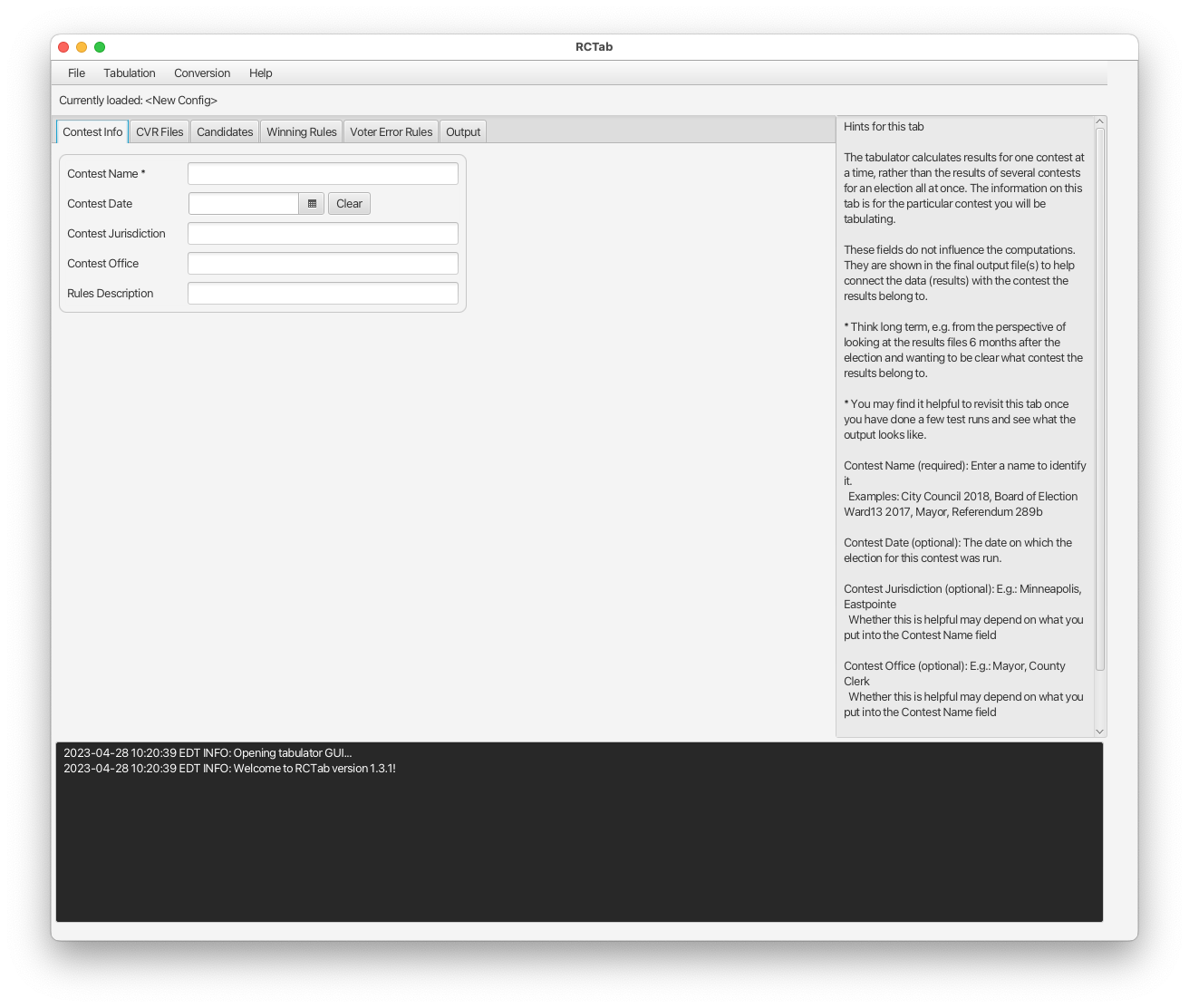
Operator logging is duplicated in the black GUI console box at the bottom of the application window. The console is provided as a convenience primarily for showing validation errors and providing feedback to the user. See screenshot below for example of this console box.
Stream 2: Contest-Specific "Audit" Logging
This data stream captures information about a specific contest tabulation. It includes all the same information written to the Execution Log (within the context of a single contest tabulation) and includes a listing of the config file being tabulated, and a record of how each cvr was counted in each round.
File Name: [time_stamp]_audit_0.log where timestamp is created when the tabulation is triggered and used on all output files for a given tabulation. For example: 2021-04-24_22-49-49_audit_0.log
File Rotation uses the same strategy as the Execution Logging. When an audit log reaches 50MB size it will be renamed along with any other preceding log files. For example:
2021-04-24_22-49-49_audit_0.log -> 2021-04-24_22-49-49_audit_1.log
2021-04-24_22-49-49_audit_1.log -> 2021-04-24_22-49-49_audit_2.log
Then a new 2021-04-24_22-49-49_audit_0.log file will be created, and logging will continue.
Each audit_N.log is created with a corresponding audit_N.log.hash file. This hash file can be used to validate the contents of its corresponding audit_N.log file with the directions in Section 23 - Trusted Build & Output Hash Verification - Windows OS
User Interface
The tabulator was originally developed for a command-line interface. The GUI (graphical user interface) was introduced both to make the process of configuring and running a tabulation faster and more intuitive and to enable users with a less technical background to use the software. The command-line interface still exists as a way to support execution via script, e.g., for batch processing and test automation. The GUI prevents the user from creating a config file that would fail many of these checks. A brief user guide to the Command Line Interface is available in Section 24 - Tabulator Command Line Instructions. More information about error messages can be found in Section 29 - RCTab Operator Log Messages.
Supported File types
The Tabulator uses the JSON format for contest configuration files and one style of results summary output. JSON is simple, popular, and easy for humans and software to read and write. The Tabulator uses CSV (comma-separated values) for the tabular version of its results summary output. CSV is a non-proprietary format that all modern spreadsheet applications can recognize. Tabulation output log files are produced in plain-text with a .log extension for clarity. RCTab reads .xlsx (Microsoft Excel) and .xml (Extensible Markup Language) cvr and elections metadata files supplied by various manufacturers (ES&S, Hart, CDF, Unisyn).
Additionally, the following documents were used to design the RCTab software:
Section 07 - System Security Specification Requirements
Section 19 - Tabulation Options for RCV Tabulation
Section 20 - Process Ranked Choice Voting Contest
Section 21 - Ballot Limitations & Maximum Testing Range
Appendix III - Ranked Choice Voting Laws Appendix
Appendix II - Expected Outcome RCV Test Sets Single-Winner
Appendix I- Expected Outcome RCV Test Sets Multi-Winner
7.4.4 Software Distribution
b. The documentation shall designate all software files as static, semi-static or dynamic.
The .json config files used to configure RCTab are semi-static. These files are modified for contest-specific configuration options such as the candidate list, winning rules and output locations.
RCTab output files, if considered part of the “software files,” are also semi-static. The summary.json, summary.csv, audit.log and corresponding .hash files output for each tabulation are different depending on the configured contest.
All other RCTab files, excluding the .json config files and output files, are static. All remaining files’ contents (specifically the source code files and 3rd party dependencies) are not modified based on the election being conducted or the equipment upon which it is installed. All executable code files are the same no matter what hardware it is installed on and no matter what voting equipment it is being used with.
9.5.2 Applicable Documents
The manufacturer shall list all documents controlling the development of the software and its specifications. Documents shall be listed in order of precedence.
- This is described in the Coding Standards and Style paragraph of Section 02 - Software Design and Specifications.
9.5.3 Software Overview
The manufacturer shall provide an overview of the software that includes the following items:
-
A description of the software system concept, including specific software design objectives, and the logic structure and algorithms used to accomplish these objectives.
- This is described in the Contest Tabulation Logic section of Section 02 - Software Design and Specifications and informed by the following documents:
- Section 07 - System Security Specification Requirements
- Section 19 - Tabulation Options for RCV Tabulation
- Section 20 - Process Ranked Choice Voting Contest
- Section 21 - Ballot Limitations & Maximum Testing Range
- Appendix III - - Ranked Choice Voting Laws Appendix
- Appendix II - Expected Outcome RCV Test Sets Single-Winner
- Appendix I - Expected Outcome RCV Test Sets Multi-Winner
-
The general design, operational considerations, and constraints influencing the design of the software.
- This is described in the Contest Tabulation Logic section of Section 02 - Software Design and Specifications and informed by the following documents:
- Section 07 - System Security Specification Requirements
- Section 19 - Tabulation Options for RCV Tabulation
- Section 20 - Process Ranked Choice Voting Contest
- Section 21 - Ballot Limitations & Maximum Testing Range
- Appendix III - Ranked Choice Voting Laws Appendix
- Appendix II - Expected Outcome RCV Test Sets Single-Winner
- Appendix I - Expected Outcome RCV Test Sets Multi-Winner
-
Identification of all software items, indicating items that were:
-
Written in-house.
- All in-house items written in-house are described in this doc under Tabulator Java Classes located in Section 02 - Software Design and Specifications.
-
Procured and not modified; and
- All third-party modules are not modified. They are described in Section 02 - Software Design and Specifications under Java 17, Architecture, 3rd-party Modules
-
Procured and modified including descriptions of the modifications to the software and to the default configuration options. The manufacturer shall also include a certification that procured software items were obtained directly from the manufacturer or a licensed dealer or distributor.
- No third-party modules have been modified.
-
We affirm that all third-party modules were obtained from the manufacturer. All of the third-party modules can be freely obtained and updated via the internet. They are maintained by their respective authors and hosted in the Maven Central Repository. More information on verifying dependencies can be found in Section 14 - Tabulator Trusted Build Instructions
9.5.4 Software Standards and Conventions
The manufacturer shall provide information that can be used by the SOS and S-ATA to support software analysis and test design. The information shall address standards and conventions developed internally by the manufacturer as well as published industry standards that have been applied by the manufacturer. The manufacturer shall provide information that addresses the following standards and conventions:
-
Software System development methodology.
Our software development methodology is feature-driven:
- New customer needs are identified and specified
- Features are designated for a particular release or deferred
- Design new or updated software to meet those needs
- Software is created or updated, reviewed and tested (see Section 13 - Quality Assurance Plan)
- Software is submitted for VSTL testing
- Iterate with test lab
- Release
-
Software design standards, including internal manufacturer procedures.
- Software specification standards, including internal manufacturer procedures.
- Software coding standards, including internal manufacturer procedures.
- Testing and verification standards, including internal manufacturer procedures, that can assist in determining the program's correctness and ACCEPT/REJECT criteria; and
-
Quality assurance standards or other documents that can be used by the ITA to examine and test the software. These documents include standards for program flow and control charts, program documentation, test planning, and for test data acquisition and reporting.
- Our software design and coding standards are based on the VVSG 1.0 VOL 1: 5.2 Software Design and Coding Standards. Additionally, we use Google Checkstyle as described in this document under Coding Standards and Style.
- Software specifications are described in our Github repo under the related issues. Our software specification standard is ad-hoc.
- Testing and verification standards are described in Section 13 - Quality Assurance Plan and Section 17 - System Test & Verification.
9.5.5 Software Operating Environment
This section shall describe or make reference to all operating environment factors that influence the software design.
- RCTab is designed to run on unmodified COTS Windows, Mac, and Linux operating systems as they are very popular, robust, mature, trusted, and they all support Java 17. For more information see the above section titled Java 17.
- RCTab core processing and tabulation logic is entirely platform (i.e., operating system) agnostic.
- All platform-specific functionality is encapsulated in the Java language implementation and Java platform libraries, including:
- Basic OS services for disk IO
- File path resolution
- Memory management
- System interrupt handling.
9.5.5.1 Hardware Environment and Constraints
The manufacturer shall identify and describe the hardware characteristics that
influence the design of the software, such as:
- The logic and arithmetic capability of the processor.
- Memory read-write characteristics.
- External memory device characteristics.
- Peripheral device interface hardware.
- Data input/output device protocols; and
-
Operator controls, indicators, and displays.
- RCTab is designed to be as efficient as possible with RAM and CPU usage in order to lower the hardware requirements needed to process an election and decrease costs for our users.
- Because the Tabulator creates an in-memory record for each CVR it processes, the maximum number of CVRs that can be processed in a single contest is limited by the amount of available RAM on the host system. See Section 03 - System Hardware Specification for more details.
9.5.5.2 Software Environment
The manufacturer shall identify the compilers or assemblers used in the generation of executable code and describe the operating system or system monitor.
- We use the javac compiler javac 17.0.2 included with OpenJDK 17.0.2 (build 17.0.2+8).
- See also Section 14 - Tabulator Trusted Build Instructions
9.5.6 Software Functional Specification
The manufacturer shall provide a description of the operating modes of the system and of software capabilities to perform specific functions.
For more information about operating modes of the system and of system capabilities to perform specific functions, please see:
- Section 01 - System Overview
- Section 18 - User Guide
- Section 19 - Tabulation Options for RCV Tabulation
- Section 25 - Configuration File Parameters
9.5.6.1 Configurations and Operating Modes
The manufacturer shall describe all software configurations and operating modes of the system, such as ballot preparation, election programming, preparation for opening the polling place, recording votes and/or counting ballots, closing the polling place, and generating reports. For each software function or operating mode, the manufacturer shall provide:
1. A definition of the inputs to the function or mode (with characteristics, tolerances or acceptable ranges, as applicable);
2. An explanation of how the inputs are processed; and
3. A definition of the outputs produced (again, with characteristics, tolerances, or acceptable ranges as applicable).
RCTab only processes ballot data once it has been exported from an election management system. It then produces a final report. For more information about the components of RCTab with regard to data input/counting and generating final count that are relevant here, please see:
- Section 01 - System Overview
- Section 18 - User Guide
- Section 19 - Tabulation Options for RCV Tabulation
- Section 25 - Configuration File Parameters
9.5.6.2 Software Functions
The manufacturer shall describe the software's capabilities or methods for detecting
or handling:
1. Exception conditions.
2. System failures.
3. Data input/output errors.
4. Error logging for audit record generation.
- Exceptions are handled using Java language built-in exception handling.
- Exceptions are logged to the Operator Log and, if a contest is being tabulated, the Audit Log.
- Tabulator Exceptions are detailed in Section 29 - RCTab Operator Log Messages.
-
System failures such as out of memory, disk input/output errors, etc. will be logged in these locations as well.
-
Production of statistical ballot data.
-
Tabulator results are described in Section 18 - User Guide under Running A Tabulation.
-
Data quality assessment; and
-
For data quality assessment, we only operate upon CVR data formatted according to the standards the manufacturers have defined for their CVRs. See election system manufacturer documentation for more information regarding CVR formatting.
-
Additionally, audit logs describe how all ballot data and configuration data in a contest tabulation was read/interpreted by RCTab.
-
Security monitoring and control.
-
Jurisdiction practices and policies govern the security monitoring control when using the tabulator. We recommend a minimum of 2 trained employees operate the system together at all times.
- For detailed information about security monitoring and control issues, please see Section 07 - System Security Specification Requirements.
- If there are additional questions outside the scope of the jurisdiction practices and policies or the documentation provided with the software regarding security issues, we recommend consulting with an information technology security specialist.
9.5.7 Programming Specifications
The manufacturer shall provide in this section an overview of the software design, its structure, and implementation algorithms and detailed specifications for individual software modules.
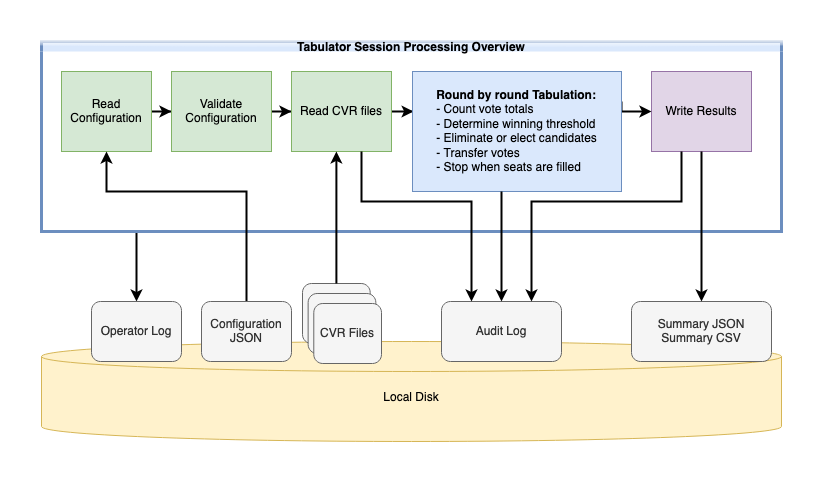
This is described in this document under Contest Tabulation Logic. Also see the below diagram located in 9.5.7.1.
9.5.7.1 Programming Specifications Overview
This overview shall include such items as flowcharts, HIPOs, data flow diagrams, and other graphical techniques that facilitate understanding of the programming specifications. This section shall be prepared to facilitate understanding of the internal functioning of the individual software modules. Implementation of the functions shall be described in terms of the software architecture, algorithms, and data structures.
This is described in the Contest Tabulation Logic section of Section 02 - Software Design and Specifications. Also see the below diagram:
9.5.7.2 Programming Specifications Details
The programming specifications shall describe individual software modules and their component units, if applicable. For each module and unit, the manufacturer shall provide the following information:
- Module and unit design decisions, if any, such as algorithms used.
- Any constraints, limitations, or unusual features in the design of the software module or unit.
- The programming language used and rationale for its use, if other than the specified module or unit language
- If the software module or unit consists of, or contains, procedural commands (such as menu selections in a database management system for defining forms and reports, on-line queries for database access and manipulation, input to a graphical user interface builder for automated code generation, commands to the operating system, or shell scripts), a list of the procedural commands and reference to user manuals or other documents that explain them
- If the software module or unit contains, receives, or outputs data, a description of its inputs, outputs, and other data elements as applicable.
- If the software module or unit contains logic, the logic to be used by the software unit, including, as applicable:
- Conditions in effect within the software module or unit when its execution is initiated.
- Conditions under which control is passed to other software modules or units.
-
Exception and error handling
- The programming specifications that describe individual software modules and their component units are described in the Tabulator Java Classes and 3rd Party Modules sections of this document.
- For additional information, see the following documents:
-
If the software module is a database, provide the information described below in Subsection 9.5.8.
9.5.8 Databases
The RCTab software does not use any databases for its operation. This requirement does not apply to RCTab.
9.5.9 Interfaces
RCTab does not rely on any interfaces for its operation. This requirement does not apply to RCTab.